Most chatbots forget you after each session. You explain what your store sells today, then have to start all over again tomorrow.
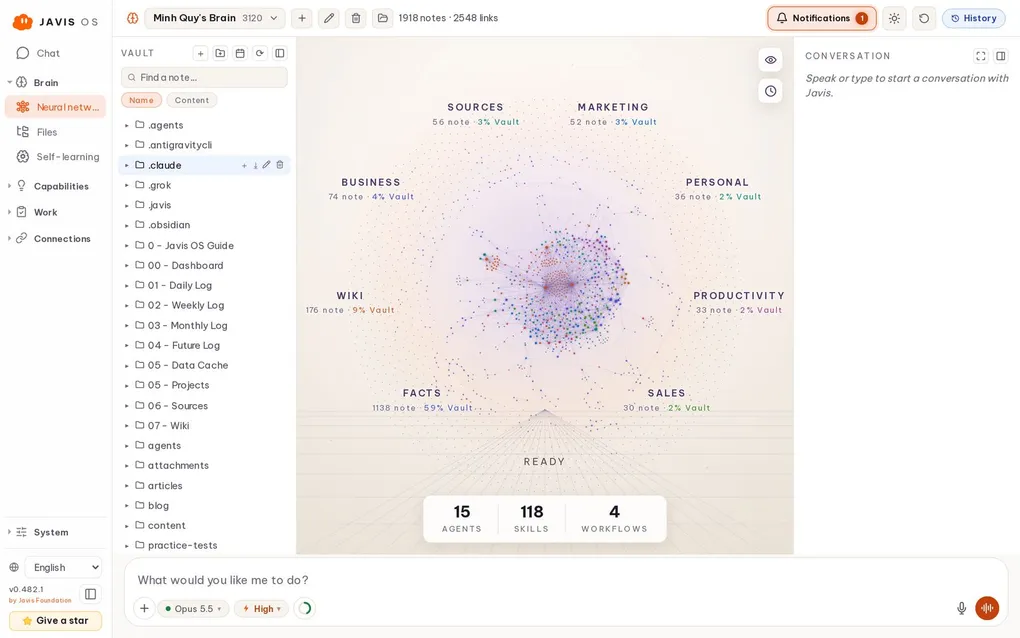
Javis OS takes a different approach: it has a Second Brain, an external brain stored on your computer that grows with every conversation. This article explains what that brain contains, how Javis learns, and how to keep it from learning the wrong things.
What is in the Second Brain?
Each brain is a folder of markdown notes. It has three core layers:
- Sources: raw material such as articles, photos, and files you drop in. These are the originals.
- Wiki: knowledge distilled into concepts, processes, and frameworks, connected through
[[links]]. Javis turns this layer into a knowledge graph on the dashboard. - Memory: long-term memory about you and your business. The file
memory/MEMORY.mdis the index, and each memory has its own file.
There are also folders for skills, agents, workflows, and reminders. Everything is a plain text file that you can read in Obsidian or any text editor.
The basic process is simple: Sources → digest → Wiki. Knowledge accumulates, instead of starting the search from scratch every time you ask a question.
Multiple brains in one Javis
You can maintain several separate brains, for example one for your store and another for your studies. Each brain has its own memory, wiki, skills, and agents.
Switch brains using the selector at the left of the top bar: all of Javis, from chat to the graph and memory, immediately switches to that brain. Already have an Obsidian vault? Click the folder button to let Javis use that vault as its brain.
How does Javis remember?
There are two ways:
1. You tell it directly. Say “Remember that the store is closed on Sundays”, and Javis immediately creates a memory file and adds a line to the index. From then on, any relevant answer takes that fact into account.
2. Javis learns on its own. Enable it on the Self-learning page, and after a few chat turns Javis rereads the conversation and extracts:
- Memories: lasting facts about you and your business.
- Wiki knowledge: reusable concepts and processes.
- Skills: multistep processes it has just carried out and found reusable.
It can also learn specialist roles (agents) and sequences of steps (workflows), but these two options are off by default so you can choose when to enable them.
Learning without causing damage: safety layers
Letting AI write to its own brain may sound a little worrying. Javis places strict limits on this:
- The learning process is read only. It cannot run system commands, search the web, or access connections such as POS or advertising accounts.
- It does not write files itself. It only returns a list of “what to learn”. Javis code handles the writing, and can only write to specifically allowed folders.
- Secret protection: content containing API keys, tokens, or passwords is not saved.
- Instruction injection protection blocks phrases like “ignore all previous instructions”, so an unfamiliar message cannot take control of the learning cycle.
Undo with one click
The first time you enable self-learning, Javis turns the brain folder into a local git repository. Each learning event is a commit. If Javis learns something incorrectly, go to the Self-learning page and undo that specific event.
Want to observe first? Choose Dry run mode: Javis only logs “what it would learn” without touching any files. Once you are happy with it, switch to Auto-write.
The brain belongs to you
Because a brain is simply a markdown folder:
- Switching models loses nothing. Use Claude today and switch to ChatGPT tomorrow: the new brain reads the same old memories.
- Take it anywhere. Enable sync to a private GitHub repository to share one brain between your laptop and VPS.
- Read it without Javis. If Javis is no longer around someday, your knowledge will still be there in plain text.
That is the biggest difference between Javis and a chat app: the model is rented, but the brain is yours.
Want Javis to do more than remember and start working for you? Read assigning background work to AI.